The best random decision tool depends on the job. Teachers usually need a name picker, creators often need a visible giveaway selector, and teams need balanced group generation more than a generic wheel. The mistake is choosing one tool for every situation.
Teachers
Teachers rarely need abstract randomization. They need a practical classroom workflow: call on students fairly, choose presenters, assign roles, or create groups. That means Name Picker and Team Picker do most of the work.
- Name Picker for student selection
- Team Picker for project groups
- Number Picker only when you already use student numbers or IDs
Creators and giveaway hosts
Creators care most about trust and visibility. The audience needs to see that the winner was chosen fairly. That is why a visible Name Picker is usually the strongest default for social giveaways, subscriber draws, and live stream selections.
Teams, facilitators, and workshop leads
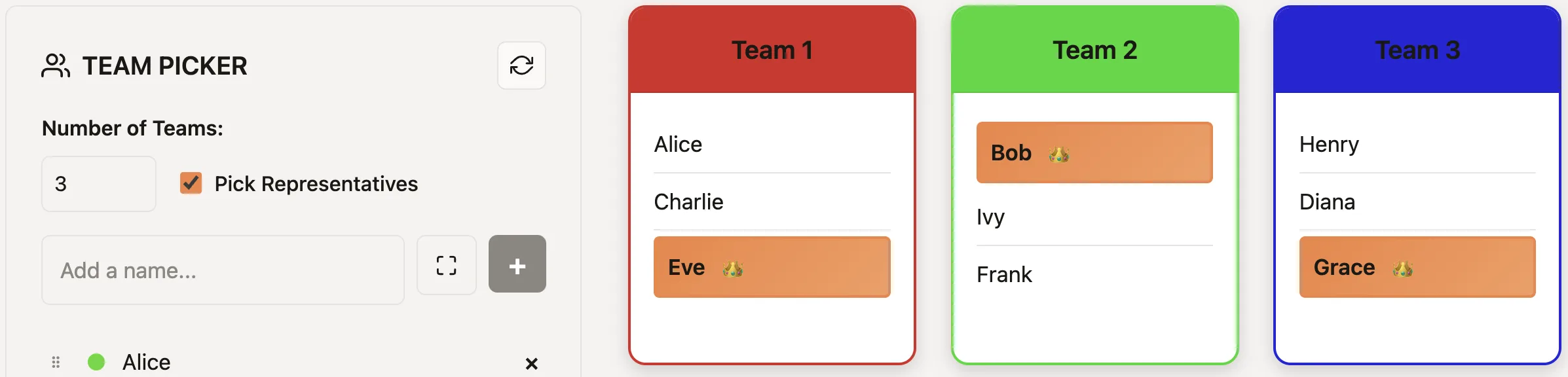
Managers and facilitators often need several groups rather than one winner. Team Picker creates evenly sized random groups with less awkwardness than captain picks or manual counting.
A simple comparison table
| User | Best default tool | Main reason |
|---|---|---|
| Teacher | Name Picker | Fair individual student selection |
| Giveaway host | Name Picker | Visible and audience-friendly winner selection |
| Workshop facilitator | Team Picker | Evenly sized groups in one action |
| Ticket raffle operator | Number Picker | Works directly from numeric entries |
A quick tool-selection checklist
- Choose Name Picker when the inputs are people, labels, or written options.
- Choose Number Picker when the valid outcomes are a numeric range.
- Choose Team Picker when every participant must be assigned to a group.
- Choose Yes/No Picker only when there are exactly two acceptable outcomes.
Start with the workflow, then the tool
Teachers can paste one class roster into Name Picker, project the first spin, and remove each selected student only when the activity needs one turn per person. A creator can clean the final giveaway list, screen-share the Name Picker, and use a documented reroll rule. A facilitator can remove absences, choose the number of groups from the activity, and generate teams once the room is ready.
These workflows solve different problems. A giveaway does not need balanced groups; a workshop does not need a single visible winner; a numeric raffle does not benefit from converting ticket numbers into names. Matching the input to the decision prevents unnecessary setup and makes the result easier for participants to trust.
Make the result easy to accept
Show the list or range before the draw when other people are affected. Tell participants whether repeat picks are allowed, whether duplicate entries are valid, and what happens if a selected person is absent or ineligible. For teams, say in advance that the goal is random, evenly sized groups rather than matching friendships or skill levels. These short rules prevent the most common argument after a random result: not whether the spin worked, but whether the process was defined fairly.
Run one short test before the real activity so the controls, list, and result flow are familiar.
Keep the final result visible long enough for participants to verify it, then save the shared link when the same setup will be used again.
Useful next reads: the classroom guide, the giveaway guide, and the team-splitting guide.
Ready to make the selection?
Open the relevant picker, add the final list or range, and use the process described above.
Frequently Asked Questions
What is the best random picker for teachers?
Usually a name picker, because classroom use is mostly about students, presenters, volunteers, or role assignments.
What is the best giveaway picker?
Use a visible name picker for entrant names or a number picker for ticket-based draws.
What is the best tool for group work?
Team Picker is best when you need evenly sized random groups quickly rather than one random choice.
Do I need one tool or several?
Usually several. Different jobs need different decision shapes, and the best tool matches that shape.